


Aadhaar Card Application Process
Residents of India are given 12-digit Aadhaar numbers by the Unique Identification Authority of India (UIDAI). Aadhaar is a unique identity number issued to residents of India after verification of demographic and biometric information. You must successfully pass several checks and data validation steps in order to be eligible for an Aadhaar number. When you apply for your card, these checks will be performed.
The enrolment process involves submitting demographic details such as name, address, and date of birth along with biometric information like fingerprints, iris scans, and a photograph.
How to Apply for Aadhaar Card?
To apply for an Aadhaar card, follow the steps mentioned below
Step 1: Find an Aadhaar Enrolment Center near you by visiting the official website of UIDAI or using the “Locate Enrolment and Update Centres” service available on the myAadhaar portal.
Step 2: Fill the enrolment form by providing all the correct information. The form can be filled at the enrolment centre or download online and filled in advance. You can download the Aadhaar enrolment form here.
https://uidai.gov.in/en/enrolment-and-updates
Step 3: Submit the duly filled form by attaching all the supporting documents like identity proof and address proof. Residents may need to provide Proof of Identity (PoI), Proof of Address (PoA), and Proof of Date of Birth (DoB) as specified by UIDAI.
Step 4:Once the documents are accepted, you need to submit your biometric data along with your fingerprint, photograph and iris scan at the enrolment centre.
Step 5:Next, collect the acknowledgement slip which contains a 14-digit enrolment number. You can use this number to check your Aadhaar card status online through the UIDAI website.
The Aadhaar card is generally generated after successful verification of the submitted details, and residents can download the e-Aadhaar online once it is generated.
Documents Required to Apply for Aadhaar Card
Indian citizens receive an Aadhaar card after providing their biometric data. The UIDAI requests a list of documents to confirm the legitimacy of applicants' information. Aadhaar cards are only generated after the necessary documentation has been completed and the submitted details are successfully verified by UIDAI.
The list of Aadhaar card documents that you must provide to apply for an Aadhaar card are as follows:
Proof of address
Proof of identity
Proof of relationship
Proof of date of birth
These documents help establish the applicant’s identity, residential address, relationship (in certain enrolment cases such as Head of Family enrolment), and date of birth. Applicants must submit valid documents from the list prescribed by UIDAI at the time of enrolment.
Commonly accepted documents include passport, PAN, voter ID, driving license, bank passbook, and birth certificate, depending on the type of proof required.
For certain cases such as Aadhaar enrolment for children or when applying through the Head of Family (HoF) method, Proof of Relationship (PoR) documents like a ration card, marriage certificate, or birth certificate may be required.
How to Get your e-Aadhaar?
The Aadhaar card can be delivered to your home address after the enrolment details are successfully verified by the UIDAI. Once the Aadhaar number is generated, residents can download the digital version of the Aadhaar card online, known as e-Aadhaar. The Aadhaar card may not be delivered to the correct cardholder within a fixed timeframe due to the enormous number of persons applying for the card. India Post will deliver the card to the registered address once it is printed and dispatched.
If a person needs his or her Aadhaar card immediately, he or she can obtain a copy of the Aadhaar card, also known as the E-Aadhaar.
Given below are the steps to obtain e-Aadhaar online:
Step 1: Visit the official myAadhaar portal on the UIDAI website
Step 2: Fill the form by providing your enrolment number or your Aadhaar number.
If you know your enrollment number, enter it along with your name, pin code, mobile number, and the day and time that are shown on your acknowledgement page.
Use your name, mobile number, and pin code if you know your Aadhaar number. After completion of the form, you will be sent a One Time Password (OTP) to the mobile number you provided. This OTP will allow you to download the colored Aadhaar letter.
The downloaded e-Aadhaar can be opened using a password, which is typically a combination of the first four letters of the resident’s name in CAPITAL letters followed by the year of birth.
How to Check Aadhaar Card Enrolment Status?
Given below are the options to check your Aadhar Card enrolment status
- You can check your Aadhaar card enrolment status through 14-digit enrolment number that you have received in your acknowledgement slip.
- You can also check your Aadhaar card status online by visiting UIDAI website. Residents need to enter their Enrolment ID (EID), date and time mentioned on the acknowledgement slip, along with the security captcha to track the status online.
- Once the Aadhaar number is generated, residents will be able to download their e-Aadhaar from the UIDAI website.
List of the Aadhaar Enrolment Centres in India
Residents can visit authorised Aadhaar enrolment centres to apply for a new Aadhaar card or update their details. These centres are available across India and are operated by banks, post offices, and government-authorised agencies under the supervision of UIDAI.
State | Address of Aadhaar Enrollment Center |
Assam | Timonagaon BO, Dibrugarh, Dibrugarh East, Jilliguri Gaon, Assam - 786010 |
Karnataka | Aadhar Center Bank of India, No 325 12th Cross Road Binnamanagala Stage 1 Indiranagar, Bengaluru, Bangalore North, Indiranagar, Karnataka - 560038 |
New Delhi | BARB0CONNU, Bank Of Baroda, B-3 , Block-B, Connaught Place Delhi, New Delhi, G.P.O., Delhi - 110001 |
Tamil Nadu | Chennai GPO, RAJAJI SALAI, Chennai, Tamil Nadu - 600001 |
Maharashtra | Union Bank Of India, Hind Jyoti Building, Gunjali Mansion, Barister Nath Pai Marg, Cotton Green., Mumbai, Maharashtra - 400033 |
West Bengal | Tollygunge HO, 14G DPS ROAD, Kolkata, Tollygunge, West Bengal - 700033 |
Gujrat | Manekbag Po, Opp - Prarthna Vihar Soc, Manekbag , Ahmedabad, Gujarat - 380015 |
Making Corrections to Information Provided During Enrolment
You can examine all the information given throughout the enrolment process and, if necessary, make modifications or corrections right away at the Aadhaar enrolment centre before the enrolment is finalised. You will have up to 96 hours following enrolment to visit the center, present the acknowledgment slip, and make any necessary revisions if you discover a mistake after you've already enrolled.
After this period, residents may need to request updates through the Aadhaar update process either online through the UIDAI portal or by visiting an Aadhaar enrolment centre.
How to Check Aadhaar Status?
If you have registered for an Aadhaar at an Enrolment Center, you can check aadhaar status there. To check your status, you'll need your Enrolment ID, or EID. On the acknowledgement slip you get after enrolling is where you can find your EID.
EID is a 28-digit number comprising two parts:
- 14-digit enrolment number in the format 012/01234/012345 and
- 14-digit date and time of enrolment in the format dd/mm/yyyy hh:mm:ss
However, to check your status, you generally need both the 14-digit enrolment number and the date/time mentioned on the acknowledgement slip. Providing the remaining 14 digits is optional.
If you have your EID number, you can check your status by visiting the Check Aadhaar Status webpage on the UIDAI website.
Retrieving Lost/Forgotten EID
In case you have lost or forgotten your EID, you can retrieve it by visiting the Retrieve Lost or Forgotten EID/UID webpage on the UIDAI website.
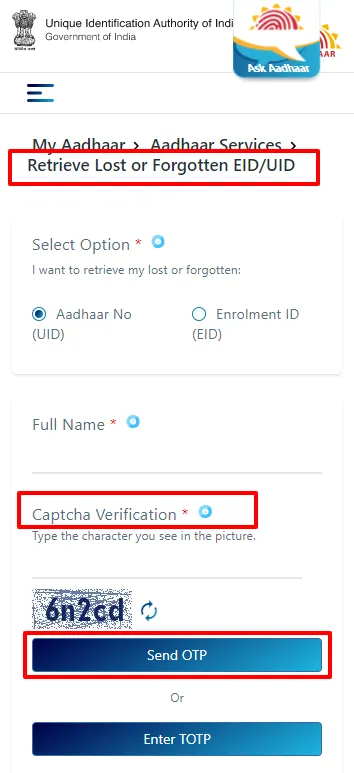
After verification through an OTP, the Aadhaar number or Enrolment ID can be sent to the registered mobile number.
How to Download Aadhaar Card?
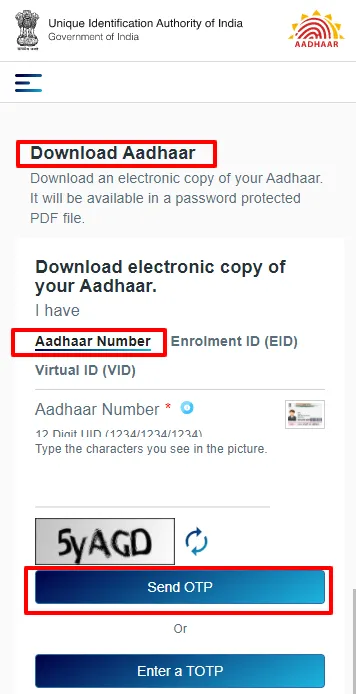
You can get an electronic copy of your Aadhaar using your EID. Follow the steps mentioned below to the aadhaar card download
Step 1: Visit the official UIDAI website.
Step 2: Choose the 'Enrollment EID' option.
Step 3: Enter your 14-digit enrolment ID number as well as the time and date values in 14-digit format.
Step 4: Enter your complete name, pin code, and image captcha code.
Step 5: Next, click on 'Request OTP' option and confirm.
Step 6: Enter the OTP that you will receive on your registered mobile number.
Step 7: Then click on the 'Download Aadhaar' option.
Step 8: Your electronic copy of Aadhaar card will be ready to download.
The downloaded e-Aadhaar is password-protected and is considered equally valid as the physical Aadhaar card for identification purposes.
Disclaimer
FAQs on How to Apply for Aadhar Card
1.What details will be captured during the enrolment process?
Demographics details - Name, date of birth, gender, and address. Providing your mobile number and e-mail ID are optional.
Biometrics - Photograph, all 10 fingers, both irises.
2.What should I do if my Aadhaar request is rejected?
Various quality checks are performed for the generation of an Aadhaar. Hence, there is a possibility that your Aadhaar request was denied because of a technical or quality-related reason. If your Aadhaar request was rejected, you can register again.
3.Can NRIs apply for Aadhaar?
Yes. NRIs are eligible to apply for Aadhaar using a valid Indian passport. Earlier residency requirements may apply depending on the case.
4.Is there an age limit to apply for Aadhaar?
No. There is no age restriction to apply. Even new-born babies are eligible to get an Aadhaar number.
5.In case I do not have all my fingers or both my irises, can I still enrol?
Yes. The software used for Aadhaar has the provision to handle such cases.
6.Will the operator charge a fee for Aadhaar enrolment?
No, the operator will not charge any fee as Aadhaar enrollment is free for Indian residents.
7.Does the UIDAI have a defined enrolment procedure for families?
UIDAI allows enrolment through the Head of Family (HoF) method, where family members can enrol using Proof of Relationship (PoR) documents.
8.Is it possible to enrol in Aadhaar by Post?
No, because your biometrics will be taken, you need to personally go to the Aadhaar enrolment centre to enrol.
9.If the appointment is cancelled, will I get a refund?
Yes, you will get the refund if the appointment is cancelled. The booking fee will be refunded according to the payment gateway rules. If a reserved service is not provided at the UIDAI ASK, the appointment can be rescheduled.
10.Are original documents required to enrol in Aadhaar?
Yes, original documents are required for Aadhaar enrolment. Once enrolment is done, the original copies will be scanned and given back to you.

Disclaimer
Credit Card:
Credit Score:
Personal Loan:
Home Loan:
Fixed Deposit:


Copyright © 2026 BankBazaar.com.